AI video models generate their own audio, and for Indian-language content that audio is often unusable. This lab tests a workflow for fixing it: generate the voices first, patch what breaks, re-sync the lips.
Kirteish Rao — Sound Designer — August 2026
The Short Version
I built a 14-second Hindi drama scene in Seedance 2.5, gave it ElevenLabs voices as references, and it came back almost perfect. One word was wrong: बेटा (beta, "son") came out as बेट — the final vowel was dropped.
I replaced that one word in Ableton using audio I had already generated, then ran the whole video through ElevenLabs' Sync 3 lip-sync model.
The audible fix is 0.25 seconds long. Everything else in the soundtrack — music, ambience, the other lines — is untouched.
But Sync 3 introduced a new problem while solving the old one: in the two-shot, it animated both characters' mouths for a line only one of them speaks. The final version is a conform of the two — the two-shot from the original, the corrected close-up from Sync 3, joined at a cut that already existed.
01
What I Was Testing
If you cannot trust the dialogue an AI video model produces, you cannot ship the scene. There are two ways to solve that, and they fail differently:
Guide it upfront
Fix it after
How
Give the video model an ElevenLabs voice as a reference so it speaks in that voice
Let the model generate, then replace the audio and re-sync the lips
Risk
The model still has to pronounce Hindi
The lips were made for different words; lip-sync has to override them
This lab does both, in that order, on the same scene.
02
The Scene
उधार(Udhaar — "The Debt"). A young man comes to a neighbourhood shop to settle his dead father's debt, and learns the debt ran the other way. His father was owed for thirty years and never mentioned it.
Four cuts, two characters, no narration.
Cut
Speaker
Line
1
Young man
काका... पिताजी का उधार चुकाने आया हूँ।
2
Shopkeeper
बैठो, बेटा। उधार तो मेरा था।
3
Young man
मतलब? उन्होंने कभी बताया नहीं?
4
Shopkeeper
कुछ लोग बताते नहीं, बेटा। बस निभाते हैं।
The script was written as a test instrument, not just a story. Every line is loaded with the Hindi sounds most likely to break in a model trained mostly on English: retroflex consonants (ट ठ ड), aspirated consonants (ध भ थ), and nasals. I predicted the first failure would be ठ in बैठो — retroflex and aspirated, with no English equivalent, sitting at the front of a line where it is fully exposed.
03
The Workflow
1
ElevenLabs Voice Design
→ two character voices
2
ElevenLabs Text to Speech
→ all of their character lines, in those voices
3
Seedance 2.5
→ video, with those files as voice references
4
Ableton
→ patch the one wrong word
5
ElevenLabs Sync 3
→ re-sync lips to the corrected audio
Step 1 — Designing the voices. Two voices built in ElevenLabs Voice Design, described by physical sound rather than character labels. The shopkeeper: a low, slightly gravelled baritone placed back in the chest, slow, with retroflex consonants landing softly and sentence endings dropping rather than closing hard. The young man: mid-range, very little projection, held back, almost no pitch variation.
Step 2 — Generating every line first. Before touching the video model, I generated all of their character lines in those two voices. This turned out to matter more than I expected, and it is the single most reusable thing in this lab. See Section 6.
Step 3 — Handing the voices to the video model. Seedance 2.5 accepts audio references with an explicit job, so both voice files went into the prompt alongside the character images, each assigned to its speaker with an instruction to match that voice exactly for dialogue and use no other audio from the file. Each dialogue line was written in the model's own syntax, naming the voice reference and the language.
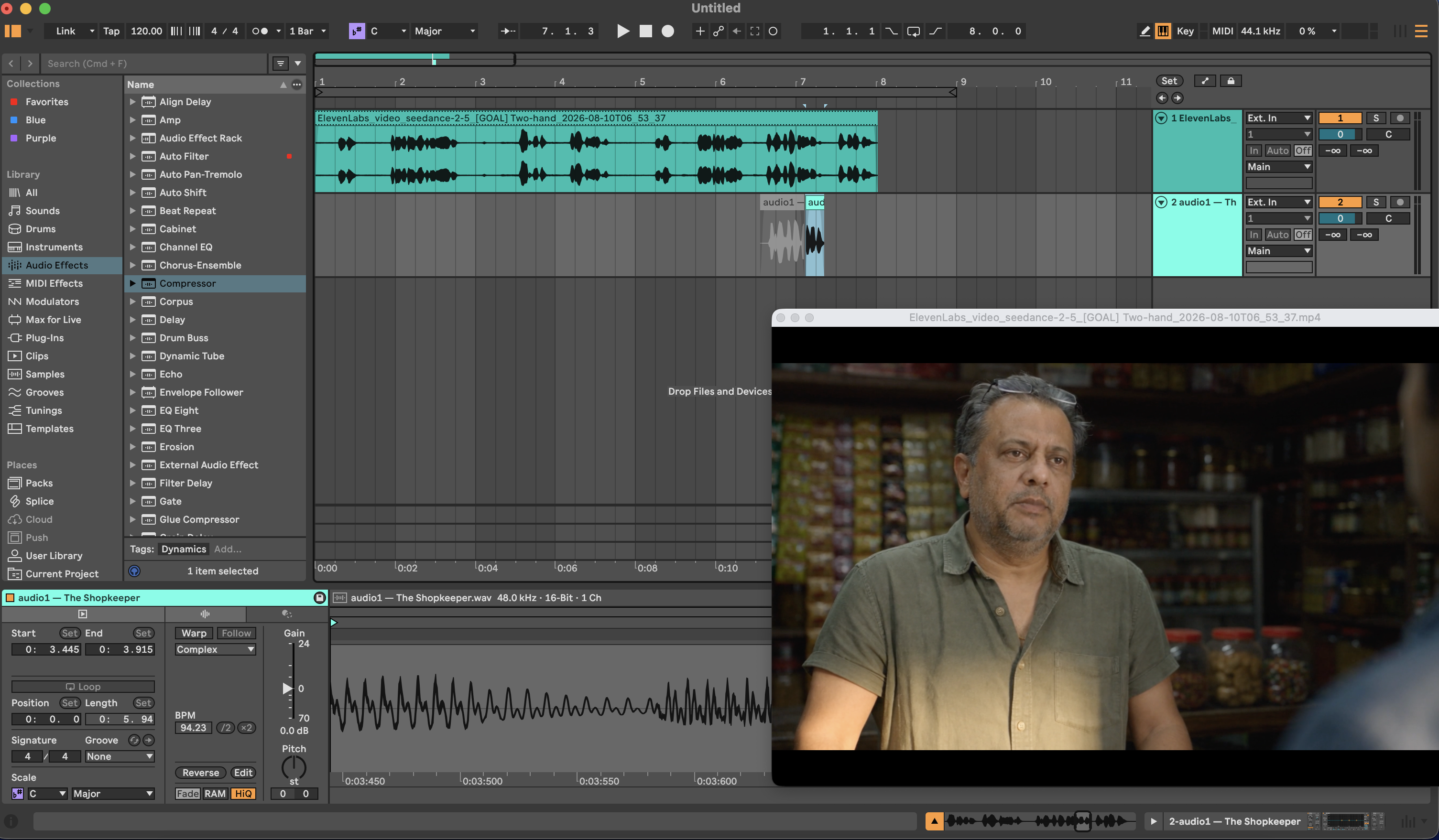
Step 4 — The patch. In Ableton: Seedance's full mix on track 1, and a short selection from the ElevenLabs shopkeeper file on track 2, placed over the wrong word.
The entire fix: one short clip, placed over one word.
Step 5 — Re-sync. The full-length corrected audio and the original video, both into Sync 3.
04
What Came Back
Almost everything worked.
Both characters held their faces and wardrobe across all four cuts. Both spoke in voices that resembled the references. The two-shot staging held — both actors angled toward camera in three-quarter view rather than profile, which is what lip-sync models need.
One word was wrong. In the final line, बेटा rendered as बेट. The retroflex ट was correct; the vowel after it was dropped.
That failure was not where I predicted. I expected ठ in बैठो to break first, because it is retroflex and aspirated and has no English equivalent. It came through clean. What broke was a word-final vowel — a simpler, more mundane failure than the one I had designed the script to catch.
BEFORE Seedance output
AFTER Sync 3 corrected
Listen at 12.5 seconds. Best experienced with headphones.
BEFORE — the Seedance output. Everything is right except one word. Both characters hold their faces across every cut, both speak in voices that resemble the references I gave the model, and the music and ambience sit where they should. At 12.5 seconds the shopkeeper says बेट where he should say बेटा.
AFTER — the Sync 3 pass. The word is corrected and the lips follow it. But watch the two-shot in the middle: Sync 3 has both men mouthing a line only one of them speaks. It fixed what I asked it to fix and broke something else.
The version I would deliver takes the two-shot from the BEFORE and the corrected close-up from the AFTER, joined at a cut that already exists in the picture. Section 7 covers why, and where.
05
The Fix, Measured
All numbers below are measured from the delivered files, not estimated.
The audible difference between the two versions is 0.25 seconds long.
Comparing the original Seedance audio against the Sync 3 output waveform by waveform:
Waveform correlation
0.9942
Region of audible difference
12.45s – 12.70s
Difference elsewhere
<0.1 dB
every other second
In other words: the music, the ambience, the other three lines and every breath between them came through the entire process unchanged. Only the corrected word is different.
Delivery specs, both versions:
Seedance original
After Sync 3
Resolution / frame rate
1280×720, 24 fps
1280×720, 24 fps
Duration
14.04s
14.04s
Audio sample rate
32 kHz
44.1 kHz
Integrated loudness
−15.4 LUFS
−15.4 LUFS
Loudness range
4.8 LU
4.9 LU
True peak
−1.1 dBFS
−1.1 dBFS
Sync 3 did not touch the levels. Identical loudness, identical range, identical peak. It re-rendered the video and re-timed the mouths without re-mixing anything. For a sound designer that is exactly the right behaviour, and it is not something I assumed going in.
06
Why the Fix Was So Small
This is the part that generalises, and it comes down to one decision made early for a different reason.
I generated every line of dialogue in ElevenLabs before generating the video. The original purpose was to have voice references to hand to Seedance. But it meant that when one word came back wrong, the correct version of that word already existed, in the right voice, in a file on my drive.
There was no second generation. No regeneration of the scene. No new prompt. The fix was locating the word in a file I already had and placing it on a timeline.
The takeaway
The reference files are not only references. They are the repair kit.
That reframes what the voice-reference step is for. It looks like a way to control the video model's output. It is also insurance against that model getting something wrong, and the insurance costs nothing extra because you generated the files anyway.
07
What Sync 3 Actually Did, Including What It Broke
The delivered video is three shots, not four. Both middle lines happen inside one continuous two-shot:
Shot
Time
Content
1
0 – 3.625s
Single — young man in the doorway
2
3.625 – 11.167s
Two-shot — both characters in frame, 7.5 seconds
3
11.167 – 14.04s
Single — shopkeeper close-up
Sync 3 failed on the two-shot.
During the shopkeeper's line — बैठो, बेटा। उधार तो मेरा था — it animated both characters' mouths. The young man, who is silent and listening, mouths the shopkeeper's dialogue alongside him.
Sync 3 output both mouths moving on one character's line
Watch the man on the right. He is not speaking.
The model has one audio track and two faces, and no way to know which face owns which words. So it drives both.
This is the behaviour every published guideline quietly avoids. All the documentation for lip-sync models assumes a single subject facing camera. Nothing I could find states what happens with two people in frame. On this scene, it drives both mouths, and the result is unusable for the full 7.5 seconds the two-shot runs.
The fix is an edit, not a regeneration. The word that needed correcting sits at 12.45s — inside shot 3, the single close-up. The two-shot never needed Sync 3 in the first place.
So the final version is a conform:
Seedance original
0 – 11.167s · two-shot, correct mouths, no fix needed
Sync 3 version
11.167 – 14.04s · close-up, corrected word
cut at 11.167s
One cut, placed at 11.167s — a shot boundary that already exists in the picture. No visible seam, because the audience is already expecting a cut there.
This is ordinary editing, and that is the point. The tool broke in a way that looks fatal and is solved by taking the good part of each version.
The takeaway
Use the lip-sync model only on the shots that need it.
08
What I Learned
Generate all your dialogue before you generate the video. It gives the video model something to match, and it gives you the parts to repair whatever comes back wrong.
Lip-sync does not have to mean replacing the soundtrack. Sync 3 re-timed the mouths and left the mix alone — music, ambience, levels, all intact. That preserves the video model's audio work instead of discarding it.
Listen wider than your hypothesis. I predicted the wrong failure and only caught the real one by listening to everything.
Lip-sync models cannot tell who is speaking. Given two faces and one audio track, Sync 3 drove both mouths. Run it on single-subject shots only.
Apply the fix per shot, not per scene. Most of this scene did not need correcting. Conforming the good parts of each version solved in an edit what looked like a model failure.
09
Observations
What holds: the dialogue problem is fixable, the fix is cheap if you generate your voices first, and I have measured it once. Those same generated files do double duty — as references handed to the video model upfront, and as the source material for the patch and the lip-sync pass afterwards.
What broke: Sync 3 cannot identify the speaker in a two-shot. In some shots it animated both characters' mouths for one character's line, across the full 7.5 seconds the two-shot runs. But even that is fixable.
What Comes Next
Failure rate. One word broke in four lines. Ten scenes would tell me whether that is typical, lucky, or unlucky, and whether the failures share a shape.
Harder staging. Profile angles, overlapping dialogue, more than two people in frame.
Regional languages. Hindi is the best-resourced Indian language these models handle. Tulu, in early testing, could not hold a basic consonant distinction. The gap between those two cases is where the real work is.