In KR//LAB 001 I generated a full audio package using a prompt-driven Gen AI audio workflow. This time I gave the same 43-second scene to four AI models that claim to score video automatically, pressed go, and measured what came back.
Kirteish Rao — Sound Designer — July 2026
The prompt-driven version KR//LAB 001
This is the human benchmark. Every automatic result below is measured against it.
01
What I Did
I took the silent scene from KR//LAB 001: a woman alone at night, a phone lights up, she reads a message, her face falls. Forty-three seconds, six shots, no dialogue.
I gave that exact same silent video to four AI tools that generate sound for video:
Sonilo — makes sound effects and music for a video you upload
ElevenLabs Video-to-Music — writes a description of your video, then composes music from it
MMAudio — a free tool that generates sound effects from video
An open-source Hugging Face - Foley Model running as a free web demo
Each one got two tries. Once with no instructions at all, letting it decide everything. Once with written instructions telling it what the scene needed. Then I compared the results against the soundtrack I built by hand in 001.
The question: can these tools do the job on their own, and does telling them what you want actually change anything?
02
What I Left Out, and Why
Two things I planned and did not do, said plainly so nobody has to guess.
I did not measure how long it takes a human to fix an AI soundtrack. That was supposed to be the headline number: take the best automatic result, clean it up, and time it. That number is what a production team would actually budget against. It did not happen, and it is the biggest gap in this study. It stays on the list as unfinished business.
I did not test the hardest moment in the scene. The plan included asking each model for the dramatic hit when she reads the message. I dropped it. By that point three of the four models could not produce a phone buzzing on a bed, which is a far easier ask. Testing them on something harder would have produced more evidence of a failure I had already established. So whether any of these tools can create a dramatic moment out of nothing remains an open question, not an answered one.
03
Finding 1: A Model Reported Success and Delivered Silence
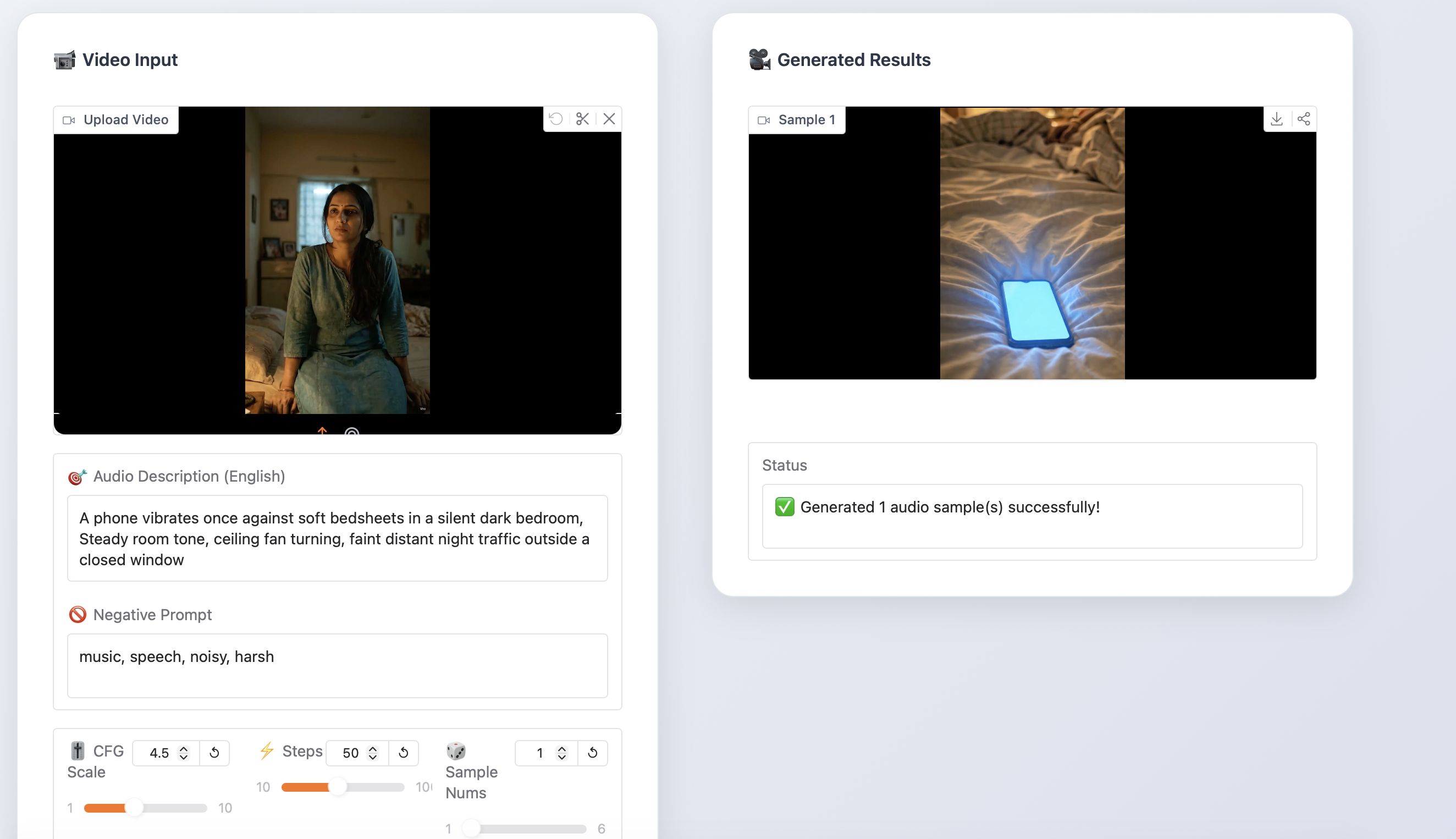
The Hugging Face - Foley Model got shot 02, the moment the phone lights up on the bed. I asked it, in plain words, for a phone vibrating against bedsheets.
It returned a file. The interface said: "Generated 1 audio sample(s) successfully."
The file contains no phone buzz. It contains no distinct sound of any kind, at a volume so low it is essentially silence. It did not produce a weak or wrong vibration. It produced nothing, and told me it had worked.
The status message the tool reported after generating silence.
Hugging Face - Foley Model directed
Asked for a phone vibration. This is what came back.
Turn it up. There is nothing there.
This is the practical lesson buried in the whole lab: a success message is not a result. If you are building a workflow around these tools, you have to check the file, not the status bar.
04
Finding 2: Sonilo Actually Watched the Picture
This one runs against the argument I made in KR//LAB 001, so it gets its own section.
I never told Sonilo where anything happens in the scene. I just gave it the silent video. Then I checked where it placed its sounds against where things actually occur on screen.
Sonilo — sound placed 0.12s from a cut it was never told about
What happens on screen
When
Sonilo's sound
Off by
The cut to the phone
11.33s
11.45s
0.12 seconds
The screen lights up
12.20s
12.55s
0.35 seconds
An eighth of a second on the first one. That is roughly three frames of film.
I expected these tools to be blind to timing. This one is not. It is genuinely reading the picture and reacting to it, without being told anything.
05
Finding 3: The Music Never Matched the Video Length
Every ElevenLabs result was the wrong length. Not slightly, either.
Run
Video
Music
Difference
Sonilo
43.0s
43.0s
matched exactly
ElevenLabs, no instructions
47.1s
53.1s
6 seconds too long
ElevenLabs, with instructions
47.1s
43.1s
4 seconds too short
ElevenLabs Studio Agent
49.0s
45.0s
4 seconds too short
Same tool, same video, six seconds too long one time and four seconds too short the next.
You cannot hear this by listening to the music on its own. It only shows up when you put it against the picture, and then every single instance is a manual fix. Sonilo was the only tool that got this right, automatically, every time.
(On volume levels: nothing delivered to the standard I set in 001. Sonilo's output was loud enough to distort on playback; the ElevenLabs tracks were far too quiet. All fixable in a minute, so it is the least interesting problem here, but worth noting that no tool handed back something ready to ship.)
06
Finding 4: What the AI Thought My Scene Was About
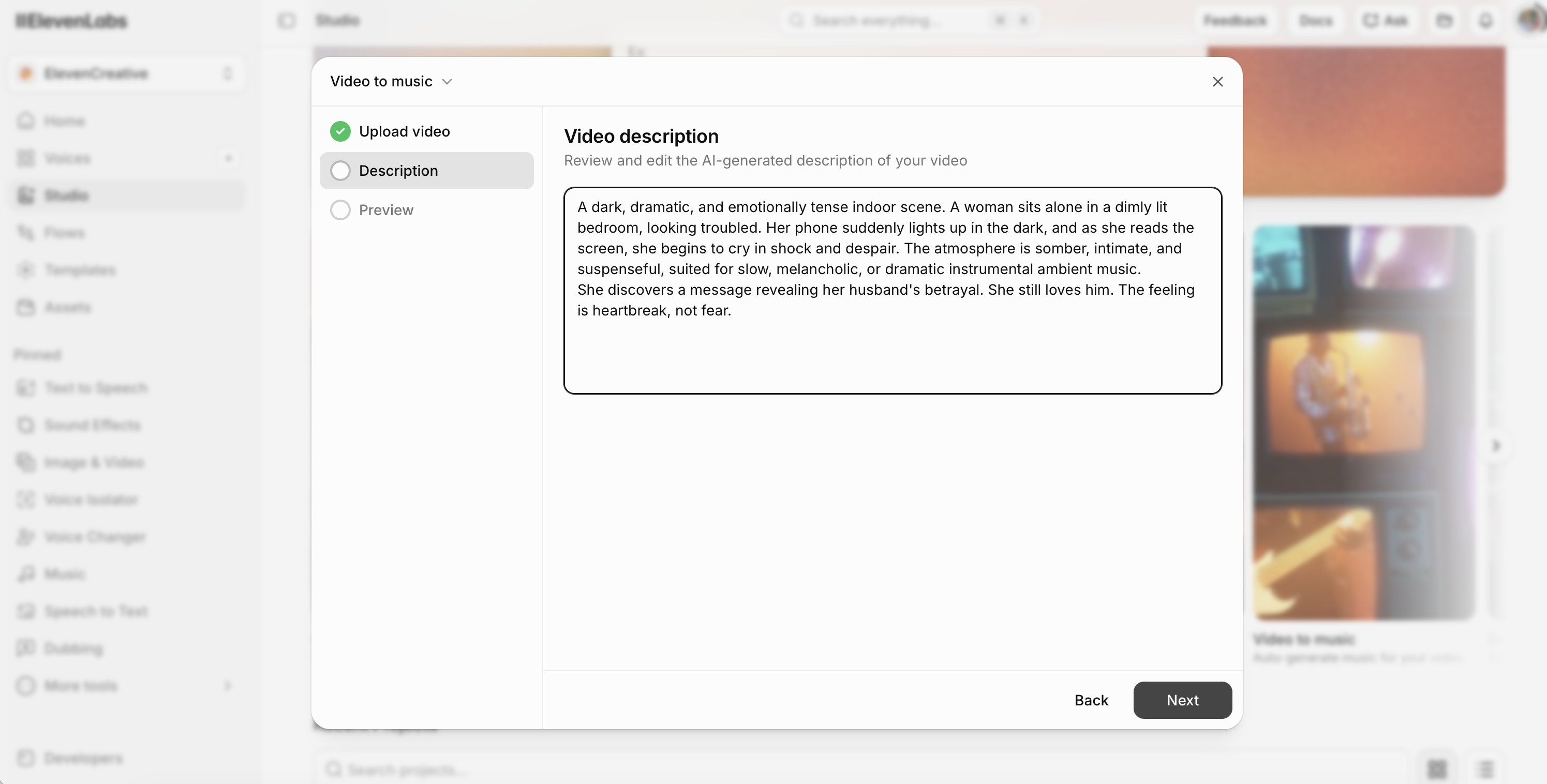
ElevenLabs shows you something no other tool does. Before it writes any music, it shows you its own written description of your video, and lets you edit it. That is the AI telling you, in plain English, what it thinks it is looking at.
Given the full scene, with no instructions from me:
A slow-paced, tense, and dramatic indoor scene set in a dimly lit bedroom. A woman is woken up by a glowing smartphone screen on her bed. She looks at it with intense emotional distress, culminating in deep, visible crying. The mood is highly emotional, mysterious, and somber…
Read it closely. She is not woken up; she is awake, sitting there, already uneasy. And "mysterious" is the wrong feeling entirely. Nothing is mysterious to her. She is having something confirmed that she already feared.
Neither of those is a hallucination. Both are reasonable guesses from the pictures. Both are wrong about the story.
Now the same scene, but only the first eight seconds:
A slow-paced, intimate indoor scene featuring a woman sitting on the edge of her bed, lost in thought. The mood is melancholy, contemplative, and peaceful… Perfect for minimal, ambient piano or solo guitar music.
Peaceful.
Same film. Same woman. Same bedroom. Shown the whole scene, the AI says distress. Shown the opening of that same scene, it says peace.
Neither description is wrong about what is on the screen. They cannot both be right about the film. The stillness at the start only means dread because of what happens at twelve seconds, and a model looking at the first eight seconds cannot possibly know that.
Then I added one sentence to the description myself:
…She discovers a message revealing her husband's betrayal. She still loves him. The feeling is heartbreak, not fear.
The music came back less melodramatic and more genuinely emotional. Closer to what the scene needed.
One sentence of human context measurably changed the result. So yes, telling these tools what you want does work. That matters, because I half expected to find it made no difference.
Even so, out of everything generated across all three runs, the version with no instruction at all was the one I liked best. Left alone, the model made a more interesting call than either of us did by steering it.
The ElevenLabs video description screen — the AI's own written read of the scene, editable before generation.
No instructions
With instructions
Studio Agent full arc
07
Finding 5: Why I Scrapped Part of My Own Plan Mid-Test
The plan was to generate sound for all six shots separately and stitch them together.
After a few shots I stopped and cut those runs from the study, because of Finding 4. Each shot, looked at on its own, produced a different emotional reading, and therefore a completely different soundtrack. One shot came back peaceful. The full scene came back tense.
Stitching those together would not give me a soundtrack. It would give me six unrelated soundtracks glued end to end.
That is not a shortcut, it is the finding. Scoring shot by shot cannot hold a film together, because the meaning of any shot comes from the shots around it, and each generation only sees its own little window.
08
What I Learned
Most of these tools make texture, not sound design. Distinct events at specific moments is the harder thing, and only one model did it.
Length matters more than it sounds like it should. Music that is four seconds short is invisible until it meets the picture, and then it is a manual fix every time.
Scoring a film shot by shot cannot work automatically, because meaning comes from context and each generation only sees its own window.
What Comes Next
KR//LAB 003
Sonic Consistency Systems for Multi-Episode Content
Finding 5 is the reason this is the next lab. Six shots of one scene, scored separately, came back as six unrelated soundtracks. One shot read as peaceful while the scene around it read as dread — a continuity failure across forty-three seconds of a single scene.
Now scale it. A short-form drama runs episode after episode, week after week. Episode 12 has to sound like it belongs to the same show as episode 4: the same room, the same emotional language, the same identity, even though it was made months later by whoever was free that week. That is the actual problem a content platform faces once it is shipping at volume, and it is the problem no generation-by-generation tool addresses, because every generation starts from nothing.
So 003 asks a different question from this one. Not "can AI make a good sound for this moment," but "can a sonic identity be defined, documented, and held across an entire series?" What has to be fixed in advance, what can be regenerated freely, and what does a human have to own so that twelve episodes feel like one show.
Still open from this lab
Time the cleanup. Take Sonilo's output, the strongest automatic result here and still not deliverable, and measure exactly how long a human needs to make it usable. That is the number a production team would plan around, and the gap this lab found is precisely what makes it worth measuring.
Test the hard moment. Can any of these tools create a dramatic beat when nothing on screen makes a sound? I stopped before answering it.
Retest on paid plans. Every conclusion here is bounded by free tiers. Sonilo in particular deserves a fair run.