The video was generated purely as a scaffold for the audio workflow. Picture quality was deliberately not the focus of this lab, and it shows.
01
The Problem
Short-form platforms are commissioning narrative content at a volume traditional audio post was never built for. AI-generated microdramas ship in vertical format on daily and weekly cadences, and every episode needs music, sound design, and ambience that feel authored, not licensed. Audiences notice stock sound, and they say so in the comments.
Text-to-audio models can now generate music and sound effects in seconds. The open question is not whether they generate, it is whether a working sound designer can build a repeatable pipeline around them that survives a real brief with a real deadline, and where exactly human craft remains non-negotiable inside that pipeline.
This lab tests that with a single production-realistic scenario, executed and documented end to end in one working day.
The brief. Written in the voice of a short-form content director, deliberately vague the way real briefs are vague:
40-45 sec vertical, episode 4 of the marriage thriller track. Scene: wife is alone in the bedroom at night, husband's phone lights up on the bed, she picks it up, reads a message, we hold on her face, cut to black. Tension, but not horror-movie tension. She still loves him. It should hurt. The phone buzz has to feel wrong before she even picks it up. Hit the reveal hard. Room should feel real, night, fan, distant traffic. It's Mumbai. No dialogue. Can't sound like a free sound pack. Delivery tomorrow 6 PM. Has to work on phone speakers. Two options for the reveal if you can.
Everything below exists to answer that brief.
02
Research: The Scene-aware Audio Landscape
Before designing the pipeline, I mapped what already exists, because a workflow that ignores automatic video-to-audio tools is answering last year's question.
Tool
What it does
Role in this lab
Veo 3.1 native audio (Google Flow)
Generates synchronized audio jointly with the video it renders
The baseline. What you get for free, kept and measured
ElevenLabs video-to-SFX
Analyzes video frames with a vision model, writes its own SFX prompt, generates matched effects
Landscape reference; candidate for a future comparison lab
ElevenLabs video-to-music
Reads motion, palette, and emotional tone from video and composes a synced track
Landscape reference
MMAudio (open source)
Video-to-audio synthesis from scene context
Landscape reference
Suno v5.5
Text-to-music, full arrangements
Primary music engine in this pipeline
ElevenLabs SFX
Text-to-sound-effect
Primary SFX and ambience engine
The pattern across the automatic tools: they optimize for plausibility. A phone on screen gets a phone sound. But the brief did not ask for a plausible phone sound. It asked for a phone buzz that feels wrong, for tension that hurts because she still loves him. Plausible and intended are different targets, and the gap between them is where this pipeline, and this role, lives. Section 7 puts numbers on that gap.
03
Design Goal
The first human act in the pipeline is translation: converting a non-technical brief into a technical spec that generation and mixing decisions can be tested against.
Brief language
Spec decision
"Tension but not horror, she still loves him"
Minimalist neoclassical bed, minor key, no percussion, tender not dissonant
"Feel it in their stomach before she picks it up"
Custom notification SFX with sub-weight, not a library ding
"Hit it hard" + "two options"
Reveal sting Option A (musical) and Option B (sound design with engineered silence)
"Room should feel real. It's Mumbai"
Three-layer room tone: ceiling fan, distant traffic through closed window, room air
"Works on phone speakers"
Mandatory mono fold-down check; sub content must not carry critical information alone
Success criteria for the pipeline itself: fast, repeatable, editable, and production-ready, meaning every generated asset must survive contact with a DAW, a picture lock, and a QC pass.
04
Workflow: What the Plan Said vs What the Work Said
The pipeline was frozen on paper before any generation, then corrected by reality. The corrections are the findings.
Correction 1: the video model changed mid-build. The scaffold scene was first built on Gemini Omni Flash in Google Flow. Omni's clips could not be extended into the longer continuous scene the edit needed, so that build was scrapped and the scene was rebuilt with Veo 3.1 Lite, whose clips support extension. Cost: one discarded video build. Lesson: model capability constraints are pipeline design inputs, not footnotes, and they can invalidate work after generation looks successful.
Correction 2: the prompt philosophy split by model type. The plan assumed one prompt-engineering approach. The work produced two opposite ones (Section 6).
Correction 3: mix decisions leaked into prompts and had to be pulled back out. Early ambience prompts specified loudness ("extremely low level"). The model does not own the fader. Level, placement, and balance belong to the DAW, and prompting them wastes a generation. Prompts now describe the sound source only; the mix describes everything else.
Correction 4: a QC conformance step was added after an AI mastering pass overshot the spec (Section 7). Verification is now a named pipeline stage, not an assumption.
05
The Build
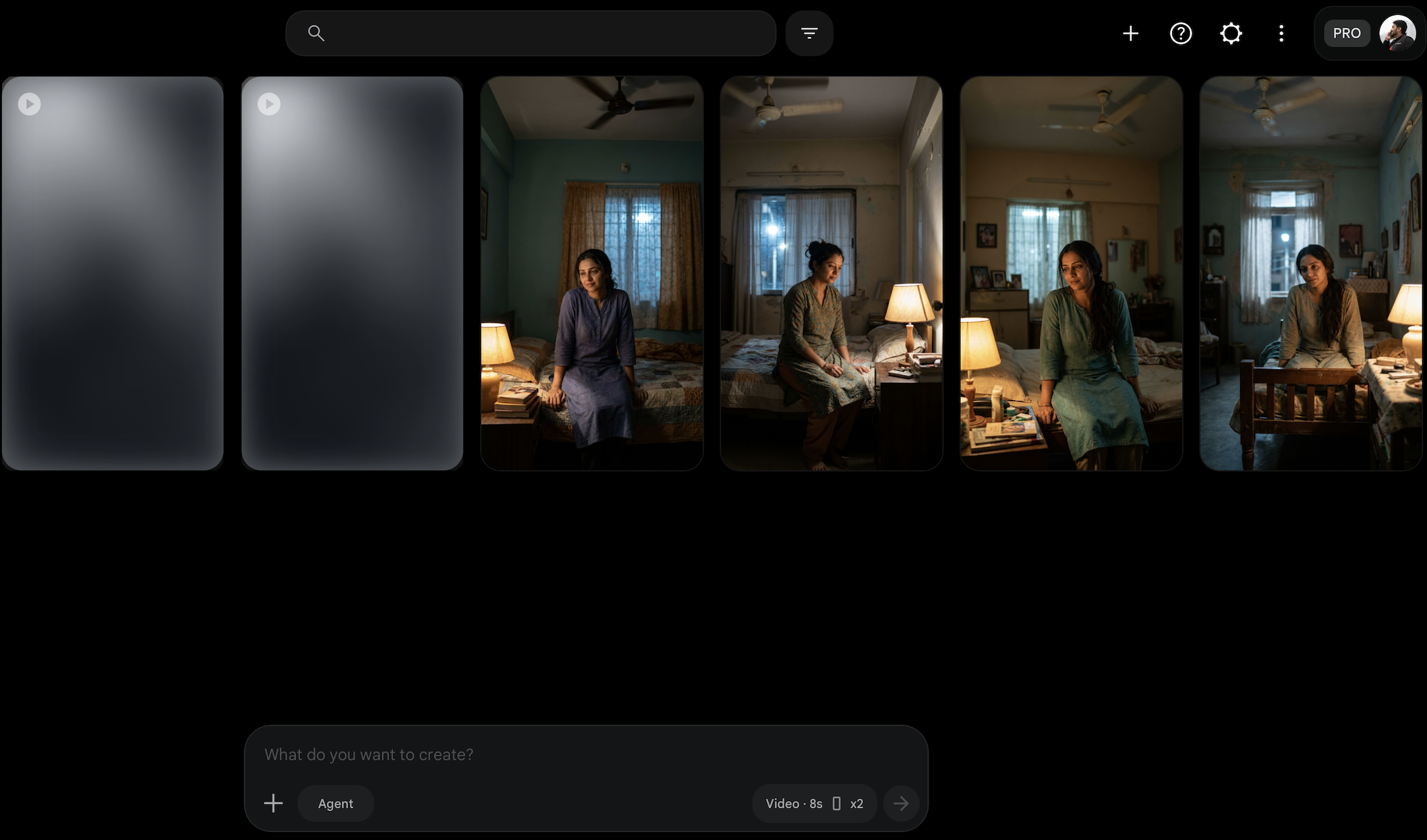
Visual scaffold. The scene was generated in Google Flow as a shot sequence from a single reference image, chosen for the most naturally lived-in room among the candidates, then assembled and cut in DaVinci Resolve Studio. Veo's native audio was exported and archived separately before being stripped, becoming the baseline this pipeline is measured against. The picture is deliberately a scaffold: unremarkable on purpose, so every judgment lands on the sound.
Google Flow reference candidates. The room at right was selected: most naturally lived-in, least staged.
A1, tension bed (Suno v5.5, instrumental). Style direction in the Style field, structural intent as bracketed section tags in the Lyrics field, hard exclusions for percussion and horror vocabulary. Accepted on the third prompt version after two documented failures (Section 6). Generated long, then restructured in Ableton to hit the scene's sync points, thinning to near-silence into the reveal.
A2, notification SFX (ElevenLabs). Multiple prompt variants generated. The winning sound came from the simplest prompt, not the most designed one. Pitch, tail, and menace were added in the DAW, where they are controllable, rather than in the prompt, where they are a lottery.
A3/A4, reveal sting, two options as briefed. Option A musical, generated with the same Suno template, which handled the short-form sting brief surprisingly well. Option B built as separate generated layers, riser, sub impact, emotional tail, assembled manually around one beat of true silence before the hit. The silence is not absence. It is the design, and no generation produced it. It was placed by hand against the picture.
A5, room tone (ElevenLabs, three layers). Fan, distant night traffic, room air, generated separately and loop-crossfaded in Ableton, mixed to be felt rather than heard.
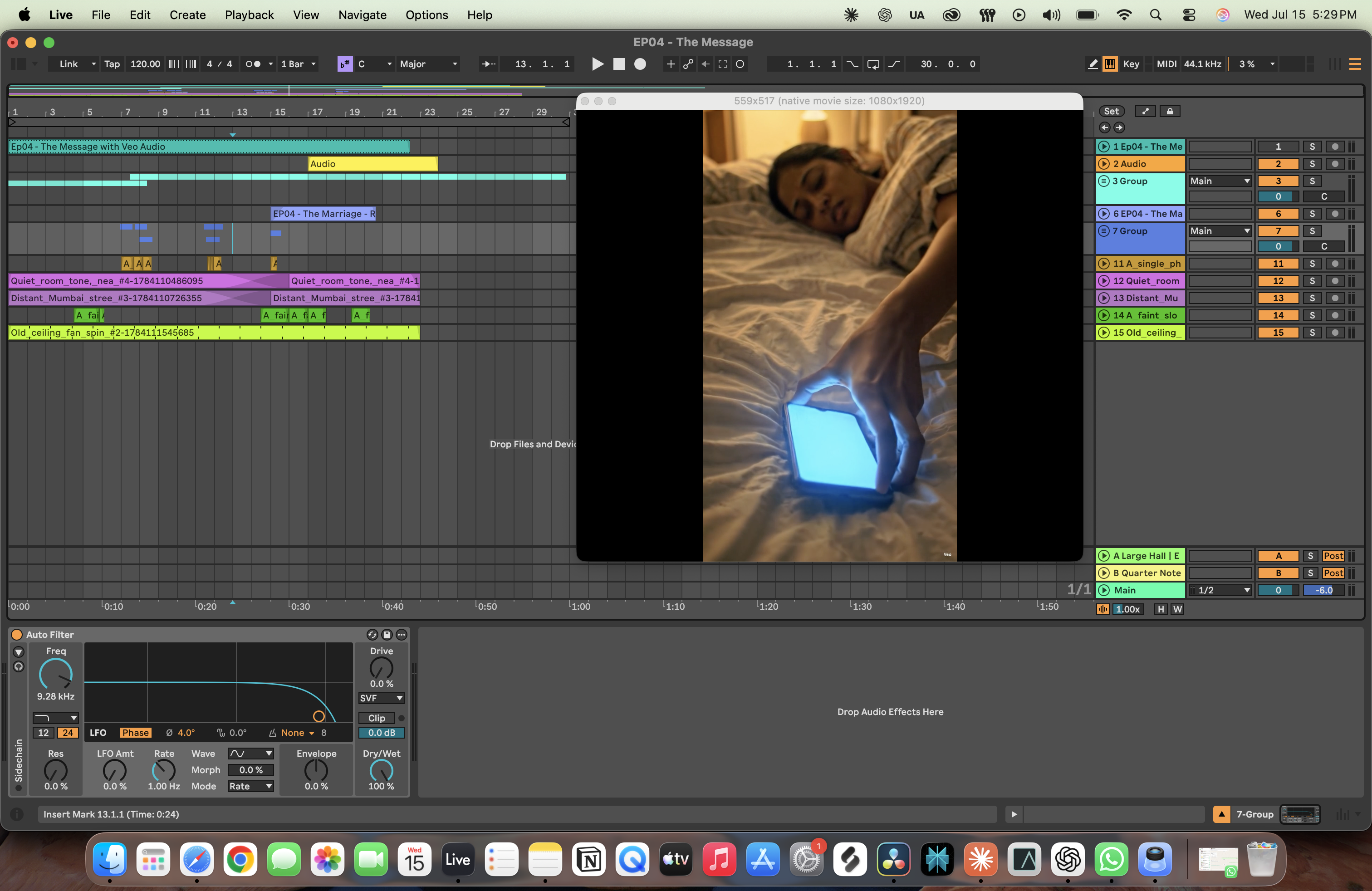
Post. All editing, restructuring, layering, EQ, and mixing in Ableton Live 12. Mastering via LANDR's AI mastering plugin, then measured against spec (Section 7). Picture conform and delivery in DaVinci Resolve Studio.
06
Prompt Engineering: Two Models, Two Opposite Grammars
The most useful finding in the lab. Music models and SFX models reward opposite prompting styles, and treating them the same wastes generations.
Suno rewards structure and density. The working template puts genre, instrumentation, tempo, key, and emotional vocabulary in the Style field, and uses the Lyrics field for bracketed structural tags even on instrumentals, effectively storyboarding the arrangement. The Exclude field does real work. Iteration chain for the tension bed:
V1: style-only prompt → failed: piano dominated the texture, too foreground for an underscore
V2: regenerated with structural section tags in the Lyrics field → arrangement followed the intended arc
V3: refined balance of style descriptors → first candidate accepted
The same template produced a usable reveal sting in far fewer attempts, which suggests the structure-in-lyrics approach generalizes across musical asset types.
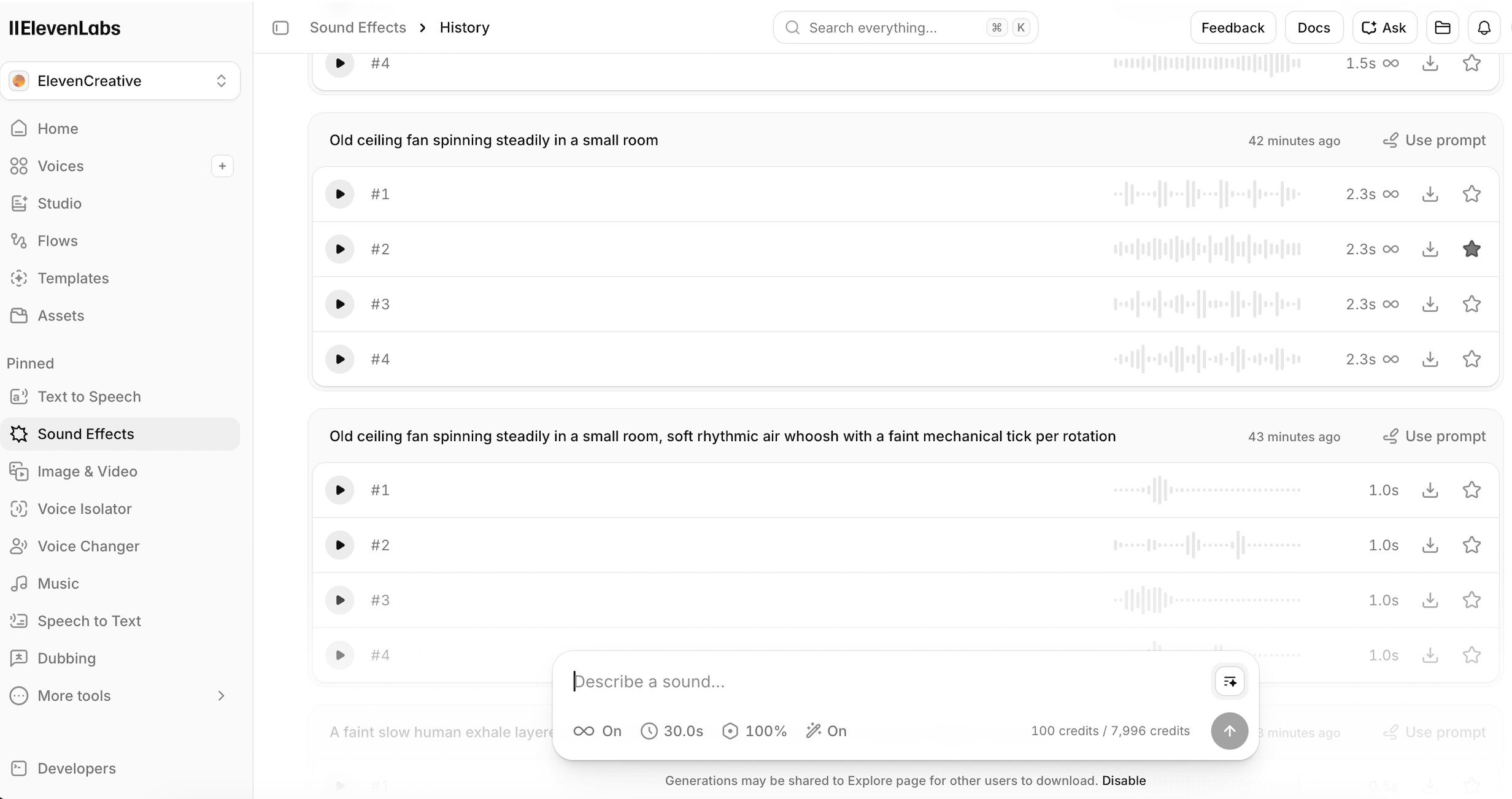
ElevenLabs rewards brutal simplicity. Two verbatim pairs from the log:
Wrote:"One short smartphone notification vibration on a mattress, pitched down slightly, with a subtle reversed metallic shimmer tail, ominous, intimate, quiet room."
Won:"One short smartphone notification vibration on a mattress."
Wrote:"Old ceiling fan spinning steadily in a small room, soft rhythmic air whoosh with a faint mechanical tick per rotation."
Won:"Old ceiling fan spinning steadily in a small room."
ElevenLabs history: the ornamented fan prompt against the simple one that won.
Every adjective past the physical description of the source is an invitation for the model to over-literalize. Character, pitch, tail, and mood are cheaper, faster, and deterministic in the DAW.
The extracted rule: prompt music models like a director, prompt SFX models like a props list, and never prompt either one with a mix decision.
07
Evaluation: Measured, Not Remembered
All numbers below are measured from the delivered files, not estimated.
The baseline gap, quantified. Veo's native audio for this scene measures -20.4 LUFS integrated with a loudness range of 25.4 LU and true peak at -5.2 dBFS: quiet, wildly uncontrolled dynamics, unusable on a phone speaker without intervention, and narratively generic. The designed mix measures a loudness range of 9.0 LU with every sound placed against picture intent. The difference is audible in the side-by-side embed above, and it is the difference between plausible and directed.
Veo baseline · Integrated
−20.4 LUFS
quiet, uncontrolled
Veo baseline · LRA
25.4 LU
wildly dynamic
Veo baseline · True Peak
−5.2 dBFS
narratively generic
Designed mix · LRA
9.0 LU
placed against intent
Spec target
−14 LUFS
/ −1.0 dBTP
Format
1080×1920
24fps · 48kHz
The QC finding. The AI mastering pass delivered the final mix at -10.1 LUFS integrated with true peak at -0.0 dBTP, against the spec of -14 LUFS / -1.0 dBTP: 4 dB hot, with a true peak that risks clipping on platform re-encode. The conformance measurement caught it. This is the clearest single argument in the lab for keeping verification human: generation is probabilistic, mastering defaults are opinionated, and the spec only means something if a person checks the file against it. The delivered file retains this master as-is; the finding stands as a documented observation rather than a corrected one.
AI master · Integrated
−10.1 LUFS
4 dB over spec
AI master · True Peak
−0.0 dBTP
clip risk on re-encode
Spec target
−14 / −1.0
LUFS / dBTP
Iteration economics. Tension bed accepted at prompt version 3. Winning SFX came from first-round simple prompts after ornamented variants underperformed. Brief to delivered mix: one working day, against a mocked 24-hour deadline.
Scorecard (1-5, honest):
Asset
Creativity
Speed
Editability
Emotional fit
Mix readiness
Tension bed (Suno)
4
4
3
4
3
Notification SFX (ElevenLabs)
4
5
4
4
4
Reveal stings (both)
4
4
4
4
3
Room tone layers
3
5
4
4
4
Editability is the consistent tax: generated audio arrives as a committed stereo render, so structural change means regeneration or surgery, never a simple stem swap.
08
Where the Human Stays: Evidence, Not Opinion
Every manual intervention during the build was logged. Categorized, they draw the boundary:
Task
AI
Human
Why
Final Ableton session. Every reveal-frame marker, crossfade, and automation lane here was placed by hand — the arrangement is the edit density this section describes.
The centerpiece exhibit is the A/B at the top of this page: the same scene with Veo's automatic audio and with the designed mix. Automatic audio answers "what sound does this look like." Sound design answers "what should the audience feel at second 32." Those are different professions, and only one of them is automated.
09
Production Discipline
A pipeline is only production-ready if its outputs survive handoff. Every asset in this lab followed a fixed naming convention encoding asset, tool, prompt version, generation number, and keep/reject status. Every generation, including all rejects, was archived rather than deleted; the rejects are the dataset that produced Section 6. Prompts were versioned per asset with the triggering failure recorded for every revision. Veo's native audio was preserved as a measured baseline before stripping. Final delivery was checked against a written spec sheet.
None of this is glamorous. All of it is the difference between a demo and a workflow a ten-person content team could actually run.
10
What I Learned
Suno is the melodic engine, ElevenLabs is the SFX engine, and the pipeline works because each does only its job.
Music models want direction, SFX models want a props list. One prompt philosophy across both is a category error.
Never prompt a mix decision. Level, pitch, tail, and mood live in the DAW.
Model constraints are pipeline inputs. The Omni extension limitation invalidated a finished-looking build; checking capability before generating is cheaper than discovering it after.
AI mastering has opinions. Mine delivered 4 dB over spec with a 0.0 true peak. Verification is a pipeline stage, not a courtesy.
The strongest moment in the mix is a beat of silence no model generated. Generation fills space; design decides where space stays empty.
Documentation during the work is what made every claim on this page checkable. A case study written afterward would have contained none of these numbers.
11
Where This Goes Next
A controlled comparison lab: this prompt-driven pipeline vs the automatic video-to-audio tools (ElevenLabs video-to-SFX and video-to-music, MMAudio) on the same scene, measured the same way.
Multi-episode consistency: a sonic identity system so episode 12 of a microdrama sounds like episode 4, the actual scale problem content platforms face.
Dialogue and voice: extending the pipeline with AI voice for narrative VO, with the same intervention mapping.
Adaptive deliverables: one design, multiple loudness and duration conforms generated programmatically from the same session.